

Introduction:
This article explains what Outlook PWA is and how to install it.
Prerequisites:
Before we begin you will need;
- Your Microsoft 365 email address and password
- Your MFA device, if you have it setup.
- Laptop or Desktop computer running Edge or Chrome.
Technical Level:
Low
What is Outlook PWA?
A PWA (Progressive Web App) is a website that can be installed and used like a normal desktop application. Microsoft Outlook on the web can be installed as a PWA, giving you an Outlook experience that looks and feels like a desktop app without requiring the full Outlook desktop software.
Using the Outlook PWA is particularly useful if you access your work email from a personal or shared computer. Because the application runs primarily through your web browser, it stores significantly less data on the device than the full desktop version of Outlook, helping to keep work information separate from personal data. Some temporary data may still be cached locally to improve performance, but Outlook PWA does not maintain the same offline mailbox data files used by the desktop application.
Microsoft 365 email accounts are business-class email services and some Microsoft 365 licences do not include the Outlook desktop application. If your Microsoft 365 subscription includes the Microsoft Office desktop apps, you can choose to use the full Outlook desktop client. However, if you have a licence such as Exchange Online Plan 1 or Microsoft 365 Business Basic, Outlook PWA provides an excellent desktop-like experience without requiring an additional Outlook licence.
Benefits of Outlook PWA
- No software installation required beyond your web browser
- Microsoft Office Desktop Apps licence not required
- Works like a desktop application
- Automatic updates
- Reduced local storage of company email data
- Available on Windows, macOS, and Linux
- Ideal for personal or shared computers
How to install the Outlook PWA
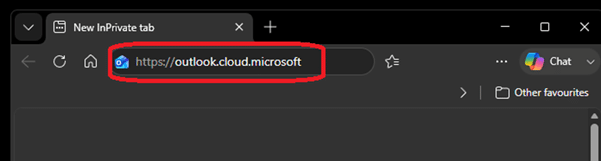
Sign in to your Webmail by opening your web browser and got to https://outlook.cloud.microsoft
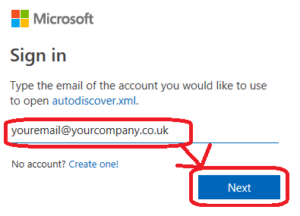
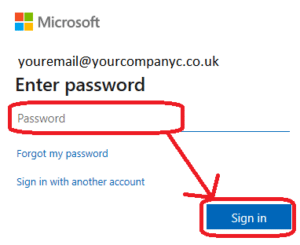
Sign in with your work email address and password.
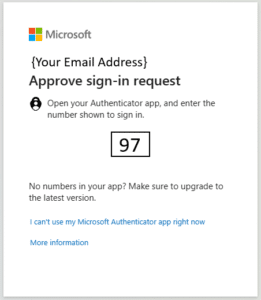
If you have Multifactor Authentication setup approve your sign in with your Microsoft Authentication App.
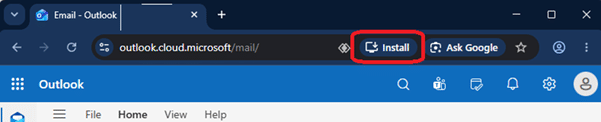
Once signed in you can installed the Outlook PWA by clicking the install App Icon in the Address Bar.
If you are using Edge it is located here.

If you are using Chrome, it is located here.
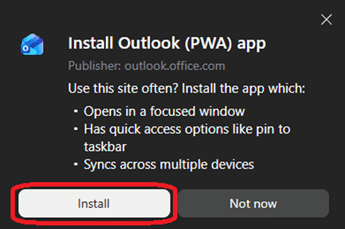
You will then be asked to confirm you want to install the Outlook PWA
It then places an icon on your desktop called Outlook (PWA), which you can now use the access your emails.

E&OE. Copying of this document, or text & images associated with it, is strictly prohibited. Imagery taken from Microsoft software is solely used for advice and training, Microsoft , Microsoft Windows and Microsoft Office are either registered trademarks or trademarks of Microsoft Corporation in the United States and/or other countries. Pro Logic Computers (UK) Ltd or its agents accept no responsibility for the content of this document or results from actions taken by it. This document is provided as is, with no warranty or liability.