

Introduction:
This article explains how to to check if your PC or Laptop is eligible for the Windows 11 upgrade.
Prerequisites:
Before we begin you will need;
- Windows 10 device. (Windows 8 or below is not supported)
- Local Admin Rights or the Administrators username and password.
- Make a backup of your device just in case something goes wrong.
Technical Level:
Mid
Introduction
Windows 10 will become end of life on the 14th of October 2025, this will mean Windows 10 will no longer get important updates. These updates make sure your device is secure. The more you continue to run Windows 10 after this date the less secure you will become. You may also find other venders will stop supporting Windows 10 and find your programs will not update or function as expected.
Windows 10 will continue to run after this date, however we would recommend everyone to upgrade before the deadline.
Download the Checker
To check if your device is eligible first download and run to Windows 11 Heath Check app from the link below.
https://aka.ms/GetPCHealthCheckApp#
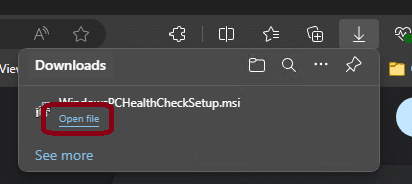
Once downloaded run the app by clicking Open File.
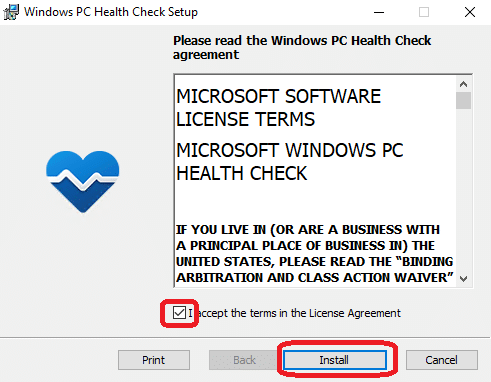
Accept the Licence Agreement and click Install.
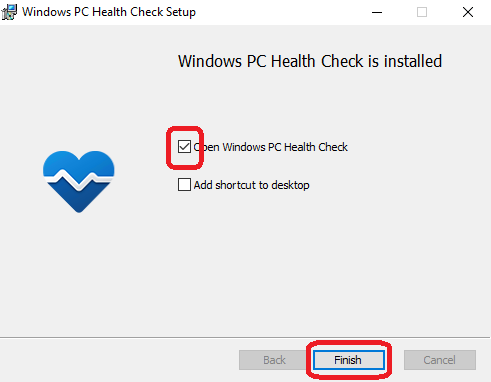
Make sure Open Windows PC Health Check is ticked and click Finish.
Run the checker
If you have already downloaded and installed the PC Health Check before search for “PC Health Check” and run.
Click on Check Now.

Check the results
In a short period of time you will get the results.
If you are eligible we would recommend you upgrade, the upgrade process could take several hours depending on the specification of your device. Make sure you do not need the device for a while and you have your charger if it is a laptop.
If you are not eligible, it will advise why, here is a list of what you you need to do in each case…
This PC must support Secure Boot.
Your device may just need Secure Boot enabling within the BIOS, or you may require a BIOS upgrade. This is something you would get from the motherboard or laptop manufacture. If you are unsure this is something we can do for you. We would strongly advise you backup your data. Enabling Secure boot, can in very rare cases, cause your PC not to boot and be unrecoverable.
If your device can not support Secure Boot then you will need a new motherboard or if a laptop you will need to look at replacing the device.
TPM 2.0 must be supported and enabled on this PC.
Just like Secure Book this is something that may require enabling in your BIOS, or a BIOS upgrade. In some cases a small TPM chip may need to be installed on your motherboard.
If your device can not support TPM then you will need a new motherboard or if a laptop you will need to look at replacing the device.
Insufficient RAM
It is advised you have at least 8GB of RAM to run Windows 11. Extra RAM can be fitted to your device if required.
Insufficient Disk Space
If you have insufficient disk space, try freeing up some space or consider a disk upgrade.
The processor isn’t currently supported for Windows 11.
If you get this message then your device is too old and will need a major upgrade or consider replacing the device. If this is a laptop the only option is to replace.
Ready to Install?
If you get all green ticks your device is ready for Windows 11. You can either wait until it downloads automatically via a Windows update or you can download and install it manually using the Windows 11 Upgrade Assistant.
To download the Windows 11 upgrade Assistant click here https://go.microsoft.com/fwlink/?linkid=2171764
E&OE. Copying of this document, or text & images associated with it, is strictly prohibited. Imagery taken from Microsoft software is solely used for advice and training, Microsoft , Microsoft Windows and Microsoft Office are either registered trademarks or trademarks of Microsoft Corporation in the United States and/or other countries. Pro Logic Computers (UK) Ltd or its agents accept no responsibility for the content of this document or results from actions taken by it. This document is provided as is, with no warranty or liability.