

Introduction:
This article explains how to find out how to disable Fast Start-Up.
Prerequisites:
Before we begin you will need;
- Local Admin Rights or the Administrators username and password.
Technical Level:
Mid
When Fast Start-Up is enabled shutting down your device will close most running programs and log you off, but the rest of Windows is suspended or put into a hibernation state. So, that the next time you power on, Windows does not have to fully reload everything. Thus, booting up quicker.
Although Fast Boot is likely a good thing and was in the days of mechanical hard drives, with faster SSD drives it is no longer a requirement for fast boot times, it does also come with some disadvantages. If something is wrong with one of the pieces of software that get suspended it will not self-fix.
Disabling this feature will ensure your computer has a clean boot every time you shutdown.
If you do not want to disable Fast Start-Up but want to have a “clean boot”, simply restart your Windows. See this article for more information. Restart v’s Shutdown.
To disable fast start up.
Search for Control Panel in the Windows Search bar, and click on the Control Panel App.

In Control Panel search for “Power” then click Power Options.
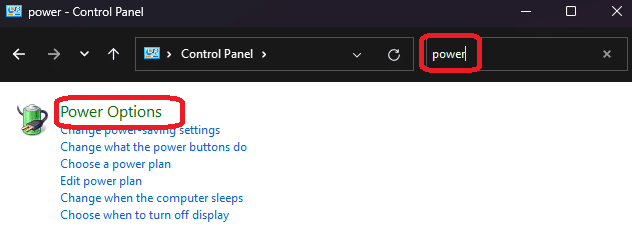
Click Choose what the power buttons do on the left.
Click Change settings that are currently unavailable
You may be prompted to enter the admin username and password, if you do you will need to speak to your IT admin to do this for you.
Untick Turn on fast start-up.
Click Save Changes.
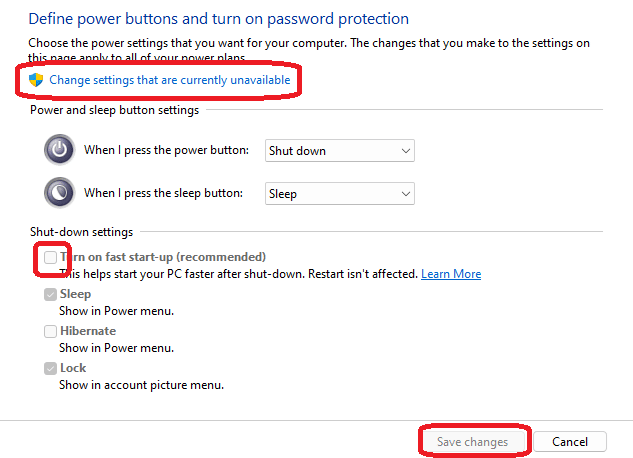
Fast start up is now disabled and your device will do a clean shut down every time.
E&OE. Copying of this document, or text & images associated with it, is strictly prohibited. Imagery taken from Microsoft software is solely used for advice and training, Microsoft , Microsoft Windows and Microsoft Office are either registered trademarks or trademarks of Microsoft Corporation in the United States and/or other countries. Pro Logic Computers (UK) Ltd or its agents accept no responsibility for the content of this document or results from actions taken by it. This document is provided as is, with no warranty or liability.