

Introduction:
This article explains how to add, edit or delete contacts from your corporate directory on your VoIP phones.
Prerequisites:
Before we begin you will need;
- Your UBOSS Username (usually your email address)
- Your UBOSS Password
Technical Level:
Low
1. Login to the UBOSS portal.
Open your browser and go to prologic.uboss.com, sign in with your UBOSS username (which usually is your email address) and password.
If you have forgotten your password use the “Forgot Password” link for a password reset request.

2. Open the Common Phone List page.
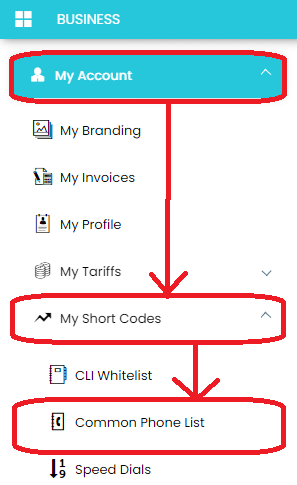
Click on My Account -> My Short Codes -> Common Phone List
3. Add, Edit or Delete the business contacts.
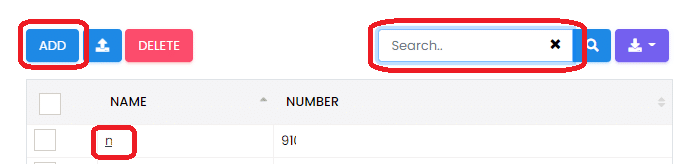
From here you can add new contacts, search, edit and delete. To edit just click their name.
E&OE. Copying of this document, or text & images associated with it, is strictly prohibited. Imagery taken from Microsoft software is solely used for advice and training, Microsoft , Microsoft Windows and Microsoft Office are either registered trademarks or trademarks of Microsoft Corporation in the United States and/or other countries. Pro Logic Computers (UK) Ltd or its agents accept no responsibility for the content of this document or results from actions taken by it. This document is provided as is, with no warranty or liability.