

Introduction:
This article explains how to adjust the amount of time Outlook stores emails locally.
Prerequisites:
Before we begin you will need;
- Microsoft Outlook
Technical Level:
Easy
In the default configuration, depending on the size of your hard disk, Outlook synchronizes only 1, 3, or 12 months of email to your Offline Outlook Data (.ost) file from the Exchange server.
If your Mail to keep offline setting is set to 12 months and you have email items in your Exchange mailbox that are older than 12 months, those items reside only in your mailbox on the server. Therefore, if you can’t connect to the Exchange server, you may be unable to retrieve items outside the range that’s specified by the Cached Exchange Mode synchronization setting until you reconnect with the server.
To temporarily view messages older than 12 months you can scroll to the end of an email list in a folder and click ‘Click here to view more on Microsoft Exchange’ or ‘More’.
To change your view permanently you can change the setting in account settings.
Open Outlook
Click File
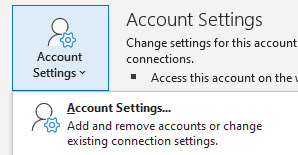
Click on Account Settings and again on Account Settings
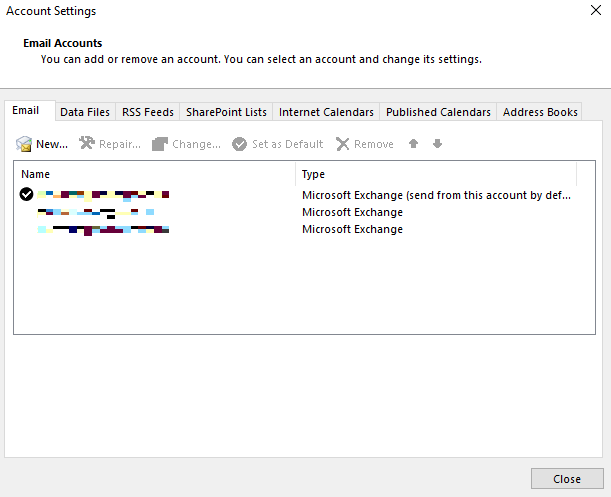
Double click on your mailbox
Adjust the slider to the required period

Click Next
Click Ok
Restart Outlook
You will now see that Outlook states it is updating your folders in the bottom right hand corner next to Connected to Microsoft Exchange. Once this is complete it will state all Folders are upto date.
- Calendar
- Contacts
- Tasks
- Journal
- Notes
- Outbox
- Shared or delegated (only for Outlook 2013)
More Information
To reduce the effect of the Outlook offline data file (.ost), the default number of months that are configured for your profile varies by the size of your hard disk. The following table provides the different default values for different hard disk sizes.
| Hard disk size | Default value for “Mail to keep offline” |
|---|---|
| Less than or equal to 32 GB | 1 month |
| Greater than 32 GB, but less than 64 GB | 3 months |
| Equal to or greater than 64 GB | 12 months |
E&OE. Copying of this document, or text & images associated with it, is strictly prohibited. Imagery taken from Microsoft software is solely used for advice and training, Microsoft , Microsoft Windows and Microsoft Office are either registered trademarks or trademarks of Microsoft Corporation in the United States and/or other countries. Pro Logic Computers (UK) Ltd or its agents accept no responsibility for the content of this document or results from actions taken by it. This document is provided as is, with no warranty or liability.